
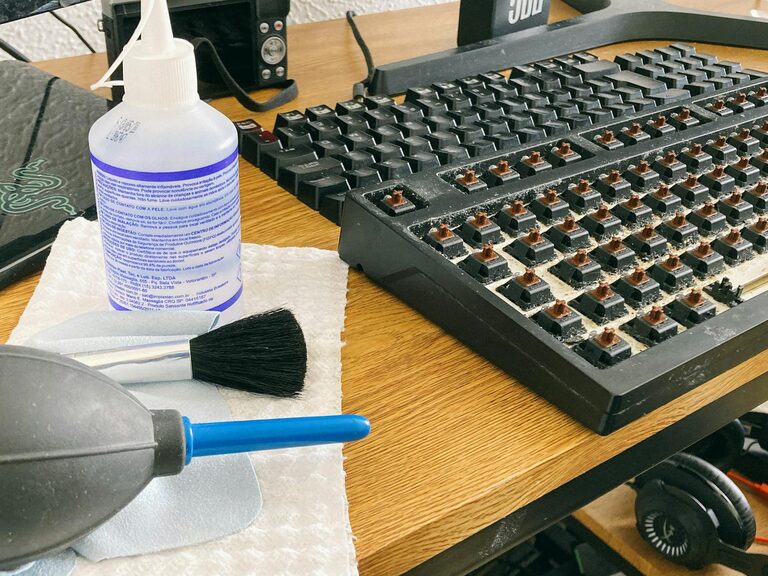
Keeping your phone and keyboard clean is essential for both hygiene and maintaining the longevity of your devices. These everyday items come into frequent contact with our hands and faces, collecting dirt, oils, and germs along the way. Cleaning them properly will not only help reduce the spread of bacteria but also keep your gadgets looking and functioning their best. This guide will walk you through safe and effective ways to clean your phone and keyboard without causing any damage.
Why Cleaning Your Devices Matters
Phones and keyboards are some of the most used items in our daily lives, and they can harbor many microbes. Over time, dust, grime, and oils can build up, leading to an unpleasant appearance or sticky keys, and potentially affect performance.
Regular cleaning:
– Reduces germs and bacteria
– Prevents buildup of dirt and debris
– Helps maintain the device’s appearance
– Prolongs the lifespan of your gadgets
What You'll Need
Before you start, gather these cleaning supplies to ensure a safe and efficient process:
– Microfiber cloths (soft, lint-free)
– Cotton swabs
– Isopropyl alcohol (70% or less)
– Distilled water
– Mild dish soap (optional)
– Soft-bristled brush or compressed air canister
– Small bowl for mixing (if needed)
Avoid using harsh chemicals like bleach or ammonia, as they may damage your devices.
—
How to Clean Your Phone Safely
Phones come in various materials and finishes, so it’s important to be gentle and cautious when cleaning.
Step 1: Power Off and Unplug
Begin by turning off your phone and disconnecting any cables or accessories. This reduces the risk of damage and accidental inputs.
Step 2: Remove the Case and Screen Protector
Take off any case or screen protector to reach all surfaces thoroughly.
Step 3: Wipe Down with Microfiber Cloth
Dampen a microfiber cloth slightly with a mixture of 50% distilled water and 50% isopropyl alcohol. Avoid spraying the solution directly on your phone to prevent moisture from entering ports.
Gently wipe the screen, back, and sides of your phone. Use light pressure and avoid scrubbing.
Step 4: Clean Ports and Buttons
Use a dry cotton swab or soft-bristled brush to remove dust and debris from ports, buttons, and speaker grills. Compressed air can also help blow out dust, but hold the can upright and use short bursts to avoid moisture.
Step 5: Dry and Reassemble
Let your phone air dry for a few minutes before putting the case and screen protector back on. Avoid using heat or rough cloths.
—
How to Clean Your Keyboard Safely
Keyboards can accumulate dust, crumbs, and germs, especially if used while eating or in dusty environments.
Step 1: Unplug or Turn Off
If your keyboard is wired, unplug it. For wireless keyboards, turn them off or remove batteries to prevent accidental keystrokes.
Step 2: Shake Out Loose Debris
Hold the keyboard upside down and gently shake to dislodge particles trapped under the keys.
Step 3: Use Compressed Air or Brush
Spray compressed air between the keys to remove dust and crumbs. Alternatively, gently brush the keyboard with a soft-bristled brush.
Step 4: Clean the Surface
Lightly dampen a microfiber cloth with a mixture of water and a drop of mild dish soap. Wring it well to avoid excess moisture. Wipe down the keys and keyboard surface carefully.
For stubborn spots, dip a cotton swab in the soapy water solution and clean around individual keys.
Step 5: Disinfect
To disinfect, use a cloth lightly moistened with 70% isopropyl alcohol. Avoid saturating the keyboard with liquid.
Step 6: Dry Thoroughly
Allow the keyboard to dry completely before reconnecting or turning it on.
—
Tips for Keeping Devices Cleaner Longer
– Wash your hands regularly to reduce transferring oils and germs
– Avoid eating or drinking near your devices
– Clean your devices weekly or as needed based on usage
– Use keyboard covers or phone cases that are easy to clean
– Store your devices in clean, dry places when not in use
—
Final Thoughts
Regularly cleaning your phone and keyboard contributes to better hygiene and helps keep your devices functioning well. With the right materials and careful techniques, you can safely remove dirt and germs without risking damage. Make cleaning a part of your routine and enjoy a cleaner tech environment!
—
If you found this guide helpful, feel free to share it with friends or bookmark it for the next time you’re ready to refresh your devices. Happy cleaning!